
Prioritize Your Content with Retrieval-Augmented Generation (RAG)
August 14, 2025
Learn how RAG enables Lectio to prioritize your course content over generic AI knowledge.
Introduction
Artificial intelligence (AI) models like are trained on vast datasets, giving them incredible general knowledge. But this breadth can be a problem: when a student asks a question, the AI may provide accurate information that doesn’t match the specific course materials or learning objectives. This was demonstrated in our previous post on context engineering, where a generic AI provided an answer that was nearly correct but not fully aligned with the course content.
Lectio solves this problem using retrieval-augmented generation (RAG) — a technique that lets AI combine its general knowledge with the precise content of your course, so students get answers that are relevant, accurate, and aligned with what they need to learn.
What is RAG?
RAG works by connecting a large language model (LLM) with a knowledge base (KB) of course materials. Instead of relying solely on the AI’s pre-trained data, RAG allows Lectio to:
- Search the course materials for relevant information.
- Retrieve the most relevant passages for the student’s question.
- Generate an answer that integrates the retrieved content with the AI’s general language abilities.
This means faculty instructors can guide Lectio to prioritize course-specific content, ensuring that the AI’s answers are tailored to your course objectives rather than generic knowledge.
How the knowledge base works
At the heart of RAG is the knowledge base, which stores course materials in a form that AI can search efficiently. To do this, Lectio converts text from slides, literature, and transcripts into vector embeddings — mathematical representations of meaning. Similar to how a library stores related books on the same shelf, vector embeddings allow chunks of content to be “placed” near each other in a high-dimensional space. When a visitor wants to peruse books on the Civil War, they might head to Main Collection, 3rd Floor; E468. With Lectio, when a student asks a question about schistosomiasis, the AI is directed to the nearby points in that high-dimensional space and retrieves the most relevant content.
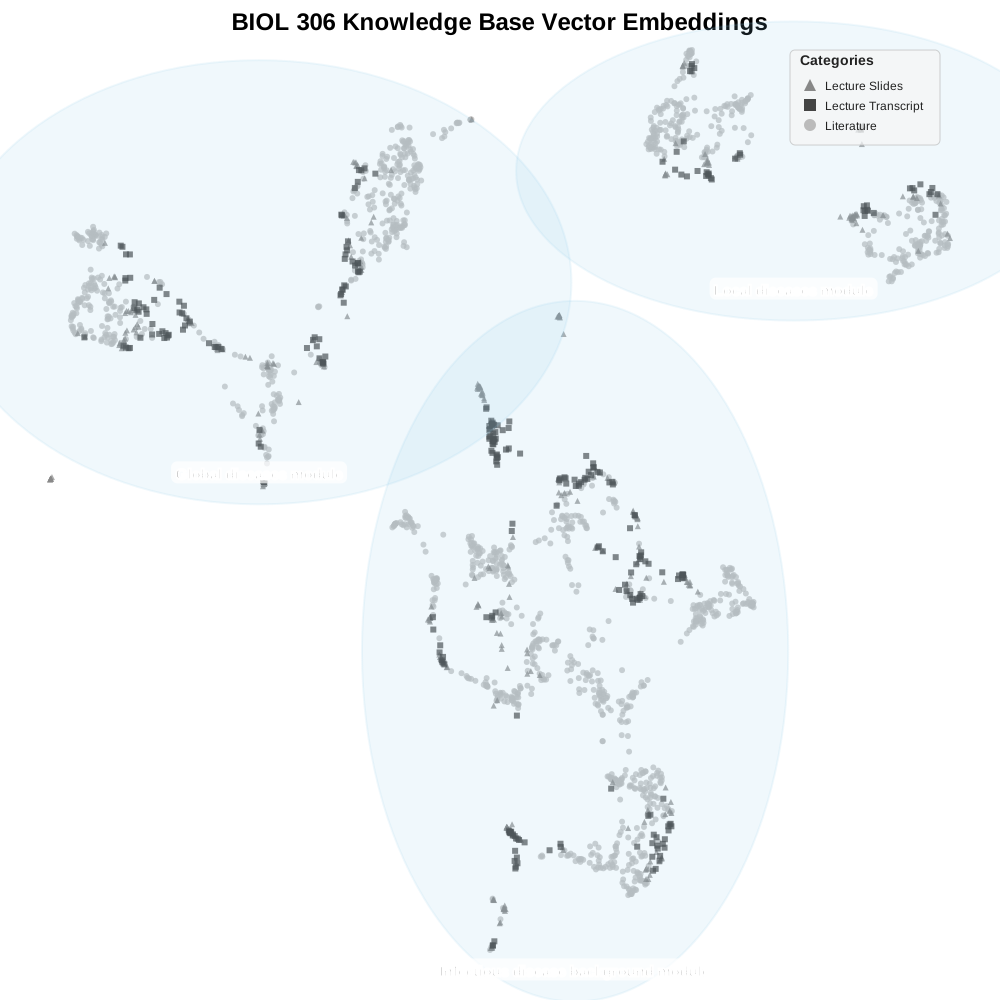
In this 2D visualization, each point represents a piece of content from the course. Similar concepts are placed close together, while unrelated topics are farther apart. Lectio does this automatically, and the clusters neatly correspond to the modular structure of the course. This structure allows Lectio to find relevant content even when the student’s query doesn’t use the exact words from the text.
How semantic search works
When a student asks a question, Lectio converts the query into its own vector embedding and searches the knowledge base for the closest matches. These top hits are then incorporated into the context that the AI uses to generate its answer.
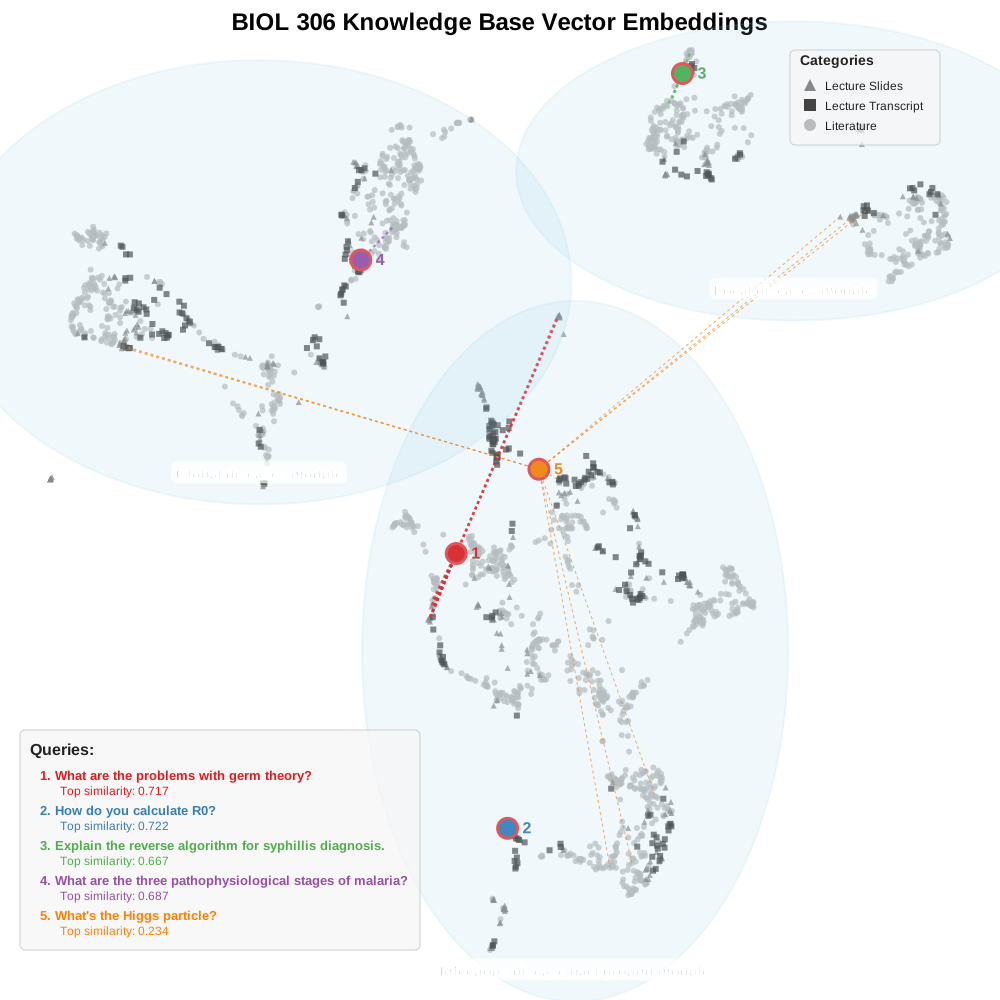
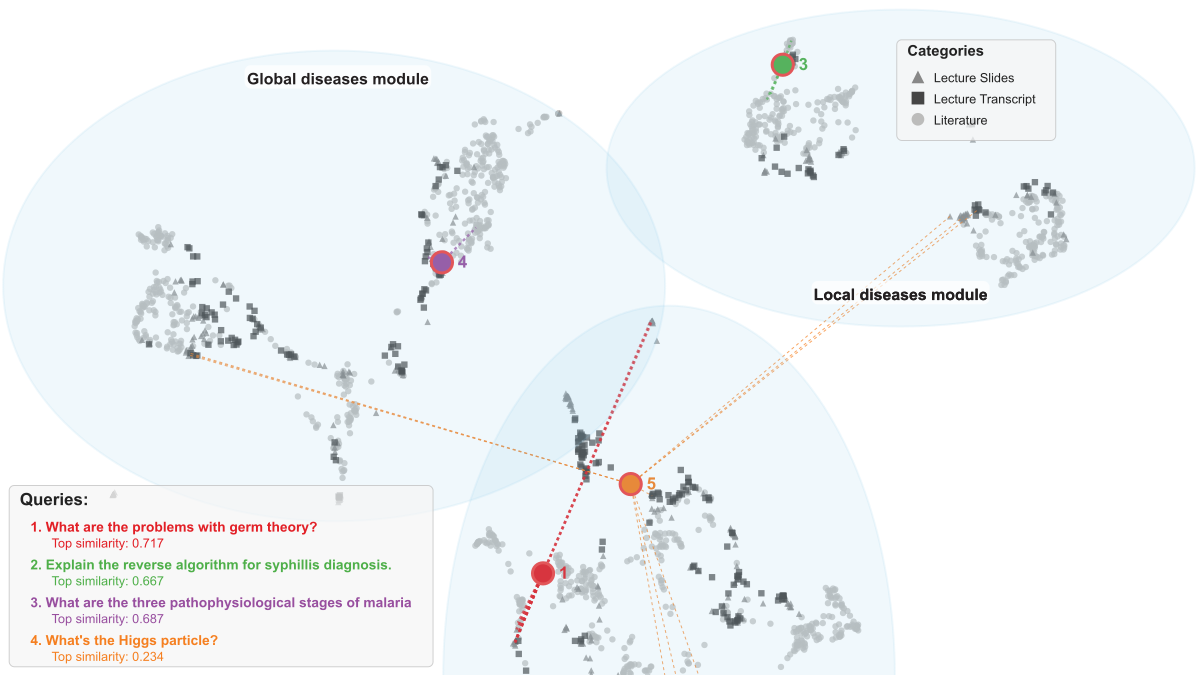
In this visualization, four course-related queries map onto the embedding space, and the most relevant course materials (highest similarity scores) are retrieved as hits. By contrast, a query that isn’t related to the course (query 5, orange) has low similarity scores, so its hits are scattered across the space.
The approach to retrieve relevant hits — called semantic search — ensures that the AI’s responses are grounded in the specific content of your course, not just its general knowledge.
Why RAG matters for students and instructors
- For students: Answers are specific to the course and less likely to include irrelevant, misleading, or hallucinated information.
- For instructors: Lectio can prioritize your course content, helping students focus on what matters most without extra effort from you.
Looking ahead: connecting RAG to backward course design
RAG gives Lectio the ability to generate accurate, course-specific answers. In the next post, we’ll explore how Lectio integrates this context with backward course design, aligning AI responses with your learning objectives to maximize student success.